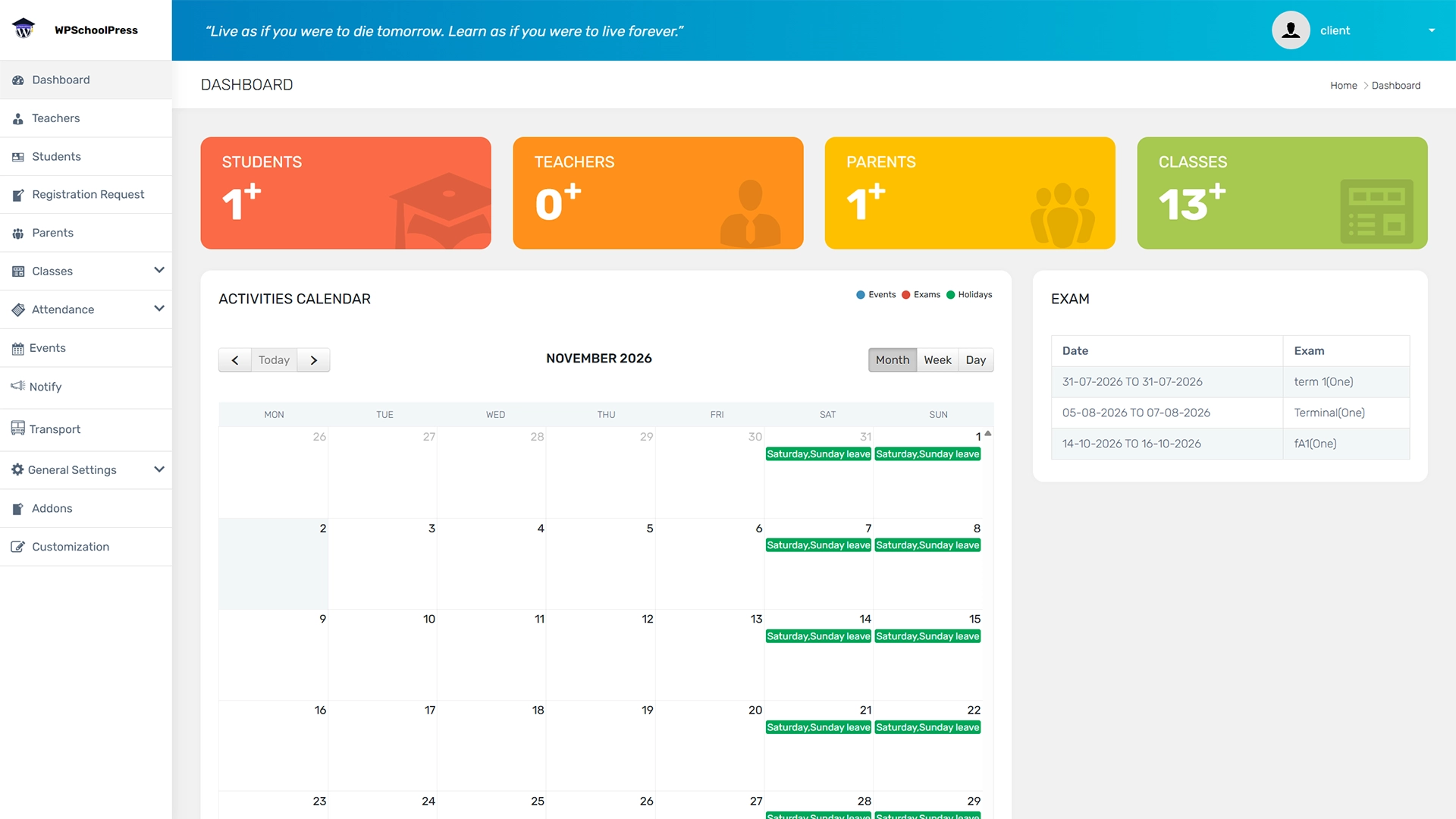
Are you looking for the best WordPress school management plugins for your educational institution in 2025? Look no further. In this article, we will provide you with a comprehensive list of the top 15 WordPress school management plugins that are currently available on the market. We have carefully curated this list based on the features, user reviews, and ratings of each plugin. By the end of this article, you will be able to choose the WordPress school management plugin that best suits your needs. Here are some of the best WordPress school management plugins:

The WordPress plugin WPSchoolPress is explicitly designed for educational institutions such as schools, colleges, and universities. It offers various WPSchoolPress features to help these institutions manage their online presence more effectively, including creating and managing classes, courses, and events; accepting online payments and donations; and communicating with students and parents through email notifications and messaging.
Some of the critical features of WPSchoolPress include:
Class management: WPSchoolPress allows you to create and manage classes and add class descriptions, schedules, and assignments.
Online fee payment and payment integration: You can accept online payments for tuition fees and donations through popular online payment gateways such as PayPal and Stripe.
Communication tools: You can send email notifications and messages to students and parents and create discussion forums.
Event management: WPSchoolPress allows you to create and manage events such as workshops, seminars, and school activities.
Overall, WPSchoolPress is a powerful tool for educational institutions to manage their online presence and improve parent-teacher communication.

LearnPress is a free and open-source WordPress LMS plugin allowing you to create and manage online courses, quizzes, and lessons anywhere. It is one of WordPress’s most popular and highly-rated LMS plugins.
With LearnPress, you can easily create courses with multimedia content, set up quizzes and assignments, and manage student enrollment and progress tracking. It comes with various add-ons and extensions to extend the plugin’s functionality.
Some of the key features of LearnPress include the following:
LearnPress also has a community of active users and developers who provide support and share their knowledge through forums, tutorials, and other resources.

A WordPress plugin, WP Courseware, allows users to create and sell online courses using a learning management system. It is known for its simplicity and ease of use interface, making it a popular choice for individuals and organizations of all sizes.
WP Courseware offers a range of features, including course-building tools, quizzes and assessments, drip-feed content, and student management. It also integrates with various other tools and plugins, such as WooCommerce and Gravity Forms, allowing for even greater flexibility.
One of the critical benefits of WP Courseware is its drag-and-drop course builder, which makes it easy to create courses without needing advanced technical skills. It also offers customizable design options, allowing users to create a branded and personalized learning experience for their students.
While WP Courseware is a premium plugin, it offers a range of pricing plans to accommodate different needs and budgets. Overall, WP Courseware is a solid option for creating and selling online courses using WordPress. However, it’s essential to evaluate the specific features and pricing plans to determine if they fit your needs.

Sensei LMS is best wordpress learning management system plugin for WordPress. It is developed by Automattic, the company behind WordPress.com and WooCommerce, and is designed to integrate seamlessly with all the other plugins for the WordPress platform.
Sensei LMS offers a range of features, including course-building tools, quizzes and assessments, student management, and payment integration. It also offers advanced features such as drip-feed content and course prerequisites. Sensei LMS also integrates with WooCommerce, allowing users to sell courses as products in their online store.
One of the critical benefits of Sensei LMS is its user-friendly interface, which makes it easy to create and manage courses without needing advanced technical skills. It also offers a range of customization options, allowing users to create a personalized learning experience for their students.
While Sensei LMS is a premium plugin, it offers a range of pricing plans to accommodate different needs and budgets. Sensei LMS is a solid option for anyone looking to create and sell online courses using WordPress and WooCommerce.

The LearnDash plugin for WordPress allows users to create and sell online courses. It is known for its ease of use and flexibility, making it a popular choice for individuals and organizations of all sizes.
LearnDash offers a variety of features, including course-building tools, quizzes and assessments, drip-feed content, and a range of payment and membership options. It also offers advanced features such as gamification, forums, and course certificates. Additionally, LearnDash integrates with various other tools and plugins, such as WooCommerce and Zapier, allowing for even greater flexibility.
One of the critical benefits of LearnDash is its customizable design options, which allow users to create a branded and personalized online learning website and experience for their students. It also offers detailed reporting and analytics, making it easy to track student progress and measure the success of courses.
While LearnDash is a premium plugin, it offers a range of pricing plans to accommodate different needs and budgets. Overall, LearnDash is a solid option for anyone looking to create and sell online courses, particularly those using WordPress as their website platform.

A popular learning management system plugin for WordPress is LifterLMS. It is designed to help individuals and organizations create and sell online courses, as well as manage attendance and track student progress. LifterLMS offers a variety of features, including course-building tools, quizzes and assessments, membership and enrollment management, gamification options, and integrations with popular tools such as Mailchimp, Stripe, and WooCommerce. The plugin is known for its ease of use and customization options, allowing users to create a personalized learning experience for their students. LifterLMS offers both a free core plugin and premium add-ons for additional functionality.

Many good WordPress LMS options are available, depending on your specific needs and budget. Here are a few popular options:
Moodle: Moodle is a free and open-source LMS widely used in education and training. It offers a range of features, including course-building tools, assessments, gamification options, and collaboration tools.
Canvas: Canvas is a cloud-based LMS that many universities and businesses use. It offers features such as course-building tools, communication tools, grading and assessment tools, and integrations with other tools such as Google Drive and Dropbox.
Blackboard: Blackboard is another popular LMS used by many universities and businesses. It offers features such as course-building, assessment, communication, and integrations with other tools such as Microsoft Office and Google Apps.

MasterStudy LMS is a learning management system plugin for WordPress. It is designed to help individuals and organizations create and sell online courses and manage and track student progress. The plugin offers a variety of features, including course-building tools, quizzes and assessments, gamification options, and integrations with popular tools such as WooCommerce and Stripe. MasterStudy LMS also offers customizable design options, making it easy to create a personalized online learning experience for students.
In addition to the core plugin, MasterStudy LMS offers premium add-ons for additional functionality, such as certificates and badges, course prerequisites, and group courses. The free plugin is known for its ease of use and intuitive interface, allowing users to quickly create and manage courses without needing advanced technical skills.
Overall, MasterStudy LMS is a solid option for anyone looking for a user-friendly and customizable LMS plugin for WordPress. However, it’s essential to evaluate the specific features and pricing plans to determine if they fit your needs.

Tutor LMS is a learning management system (LMS) that allows you to create and sell courses and create online courses. It is a powerful WordPress plugin with a range of features to help you create and manage your e-learning platform. Some of the critical features of Tutor LMS include the following:
Course Builder: Tutor LMS offers a powerful course builder that allows you to create multimedia-rich courses easily. You can add videos, quizzes, assignments, and more to your courses.
Student management: You can manage your students’ progress, track their performance, and communicate with them through the Tutor LMS student dashboard here.
Monetization options: Tutor LMS allows you to sell your courses online lessons through various monetization options, including one-time payments, subscriptions, and memberships.
Gamification: You can engage your students by adding gamification elements such as points, badges, and certificates to your courses.
Integration with popular plugins: Tutor LMS integrates seamlessly with popular WordPress plugins such as WooCommerce, bbPress, BuddyPress, and more.
Overall, Tutor LMS is a comprehensive and flexible LMS complete solution that can help you easily create and manage your e-learning platform.

WP Education is a WordPress theme for educational websites such as schools, universities, and educational institutions. It offers various features and functionalities to create your institution’s professional and engaging online presence.
Customizable homepage
You can customize the homepage with a drag-and-drop page builder, pre-built templates, and multiple layout options.
Course management
WP Education offers a course management system to create, manage and sell courses. It supports various course formats such as video, audio, text, and images.
Event management
The theme offers events management to schedule and promote events, seminars, and webinars.
Responsive design
The theme is mobile-friendly and responsive, ensuring that your website looks great on all devices.
Custom widgets
WP Education has custom widgets to add features such as a course list, calendar, and contact forms.
SEO optimized
The theme is optimized for search engines, ensuring that your website is easily discoverable by potential students.
Multilingual support
WP Education supports multiple languages, making creating a website in any language easy.
Overall, WP Education is an excellent choice for educational institutions seeking an effective online presence. It offers a range of features and functionalities to manage courses, events, and website design and is customizable to fit your specific needs.

School management refers to the process of managing and organizing the day-to-day operations of a school. It involves various tasks such as managing student data, managing courses, tracking attendance and student admission, managing faculty and staff, managing finances, and communicating with parents and students.
School management systems and software can be made more efficient and effective, which automates many of these tasks and allows administrators to easily access and analyze their school manage attendance data. Some of the key features of the best school management system and software include:
Overall, school management software can streamline the operations of a school and make it more efficient, saving time and resources complete school operations. By using traditional school workflows with a complex school operations transparent and system automating many administrative tasks, school administrators can focus on providing quality education to their students.

Ekselen is a School Management System that offers various features and functionalities to help educational institutions manage their operations more efficiently. Some of the key features of the Ekselen School Management System include:
Overall, Ekselen is a comprehensive School Management System that can help educational institutions streamline their operations and improve their efficiency. It offers a range of features and functionalities to manage students, staff, finances, and communication and is customizable to fit specific needs.
A School Management System (SMS) is a software application designed to manage and automate the administrative and academic functions that manage the complete school operation of a school. An SMS can help school administrators, teachers, parents, and students to manage complete school operations by providing a centralized platform to manage various school activities, including:
An SMS can help schools improve their efficiency, reduce paperwork, and increase transparency in school operations, leading to better student outcomes and a more positive school experience for all stakeholders.

Schoex is a web-based school management system that offers a range of features to help schools manage their day-to-day operations efficiently. The software is designed to streamline administrative tasks and improve communication between students, teachers, and parents.
Some of the critical features of Schoex include the following:
Schoex is a paid software, and pricing is available on their website. If you’re interested in using Schoex, visit their website at www.schoex.com to learn more and sign up for a free demo.

SakolaWP is a school management system and learning management system that is built on WordPress. It offers a range of features to help schools manage their daily school operations transparently well, including student data management, class scheduling, attendance tracking, grade book, counter school management system, notification system, and more.
Some of the critical features of SakolaWP include the following:
SakolaWP is a paid software, and pricing is available on their website. If you’re interested in using SakolaWP, visit their website at www.sakolawp.com to learn more and sign up for a free demo.
When choosing a WordPress Learning Management System (wordpress lms plugin), there are several important factors to consider:
Look for an LMS that has the features you need to create and manage courses, such as course creation tools, product language management, student management tools, and analytics.
Choose an easy-to-use and intuitive LMS, both for you as the instructor and your students. Look for an LMS with a user-friendly interface and ample documentation and support.
Ensure the LMS is compatible with your existing WordPress site and any other tools you plan to use, such as payment gateways or e-commerce plugins.
Look for an LMS that allows you to customize the look and feel of your course pages and the overall structure of your free courses.
Consider an LMS that integrates with other tools you use, such as email marketing tools or social media platforms.
Choose an LMS that provides reliable and timely support, whether it’s through documentation, tutorials, or direct support from the vendor.
Consider the cost of the LMS and whether it fits within your budget. Some LMS charge a one-time fee, while others have a monthly or annual subscription fee.
Check online reviews and recommendations from other instructors to help you decide which LMS to choose.
It would only be possible for schools to manage course providers to function with the core features provided by these plugins. Ten years ago, it would have been done offline, using some desktop software at best, or on paper. Today, this access is likely available to online and onsite courses 24/7.
The advantages of online courses in multiple schools and classes are undeniable, and these plugins powerfully reflect this through their payment options. While one plugin is likely to be the core element of your e-learning program, they also provide invaluable aid to traditional schools. This assistance enhances the quality of life for all involved, being far more than a mere afterthought.
All the solutions we selected have more in common than differences, with a few unique features sprinkled in each case.
A WordPress school management system plugin is a software application designed to help schools and educational institutions manage their administrative tasks and operations more efficiently. These plugins can help with student registration, attendance tracking, grade reporting, and scheduling tasks.
To install a WordPress school management plugin, you will need to log in to your WordPress dashboard, navigate to the Plugins section, and click the Add New button. You can search for the plugin you want to install and click the Install button.
Some popular WordPress school management system plugins include LearnPress, WPSchoolManagement System, and LifterLMS.
The specific steps for using a WordPress school management plugin will depend on the plugin you have installed. Generally, you must configure the plugin settings, add student and course information, and use the plugin’s features to both manage complete school operation and various administrative tasks.
Some WordPress school management plugins are free, while others may require a one-time or recurring payment. It’s essential to research the features and pricing of each plugin before making a decision.
Most WordPress school management plugins allow for customization, such as changing the colors and fonts used in the interface or adding custom fields to student profiles. However, the level of customization will depend on the specific plugin you are using.
While some technical expertise may help install and configure a WordPress school management plugin, most plugins are designed to be user-friendly and intuitive. Many plugins also offer documentation and support to help users with technical issues or questions.
A school management plugin for WordPress is a software tool that helps manage school operations such as student information, class schedules, attendance, grades, and communication with parents and teachers. It can be installed as an add-on to a WordPress website.
The features you should look for in a school management plugin depend on the specific needs of your school. However, some essential features include student information management, attendance tracking, grade management, class scheduling, messaging and communication tools, and parent portals.
Yes, most school management plugins for WordPress are easy to install and easy to use interface too. They come with intuitive interfaces that allow you to easily manage different aspects of school operations. However, some plugins may require technical knowledge to set up and configure.
Yes, most school management plugins for WordPress are secure. They follow industry-standard security practices, such as encryption and user authentication, to protect your school’s data from unauthorized access and cyber threats.
Yes, most school management plugins for WordPress can be customized to fit the specific needs of your school. They usually come with settings and configuration options that allow you to customize the plugin’s behavior and appearance.
Yes, you need a WordPress website to use a school management plugin. The WPSchoolPress Paid Add-Ons provide enhanced features for managing school operations seamlessly, utilizing your WordPress website’s infrastructure and resources.

Hi, I’m Alex Smith, a Subject Matter Expert at WPSchoolPress. For over six years, I’ve helped schools digitize operations like attendance, fee management, and academic workflows. I’m passionate about using processes automation and smart technology to make school management faster, more efficient, and student-focused. Through my blog, I share practical tips and automation strategies to help schools simplify and streamline their workflows.
Explore all the features of WPSchoolPress like attendance management, student grading system, etc by trying it’s live demo

April 2, 2026

March 24, 2026

October 13, 2025

September 22, 2025

September 13, 2025
Stay updated with our latest news & updates. We promise not to spam!
Share a few details about your school and our team will set up your WPSchoolPress website for you.